Understand the updated safeguards for SMS campaigns
Selected accounts are evaluating revised SMS quality safeguards. Here is how warnings, temporary bulk pauses and Support reviews differ.
- Creator Platform

A phased change, not a promise of uninterrupted sending
Updated SMS quality safeguards are being evaluated with selected accounts. Other accounts retain their existing safeguards during the phased evaluation. Check the notices and controls available in your account rather than assuming the new rules apply everywhere.
For opted-in lifecycle campaigns, the aim is to make quality problems easier to spot and address. Delivery still depends on carriers, consent and sending practices; the changes do not guarantee fewer restrictions for every account.
Understand the evaluation window
Current guidance measures opt-out rates and carrier filtering separately over a rolling seven-day window, once at least 500 SMS have been sent in that window. Below that volume, this quality evaluation does not trigger warnings or restrictions. Only carrier filtering reported as Error 30007 counts toward the filtering rate. RCS is excluded from these calculations.
New accounts have fewer than seven days of SMS sending history. Established accounts have seven days or more. Under the updated rules, either metric can trigger action independently:
- New accounts: opt-out warnings start at 3% and restrictions at 10%; Error 30007 warnings start at 10% and restrictions at 50%.
- Established accounts: opt-out warnings start at 4% and restrictions at 6%; Error 30007 warnings start at 15% and restrictions at 25%.
A warning is different from a bulk pause
A warning does not stop sending. A restriction pauses bulk, workflow and campaign SMS, while one-to-one messaging in Conversations remains available for individual customer replies.
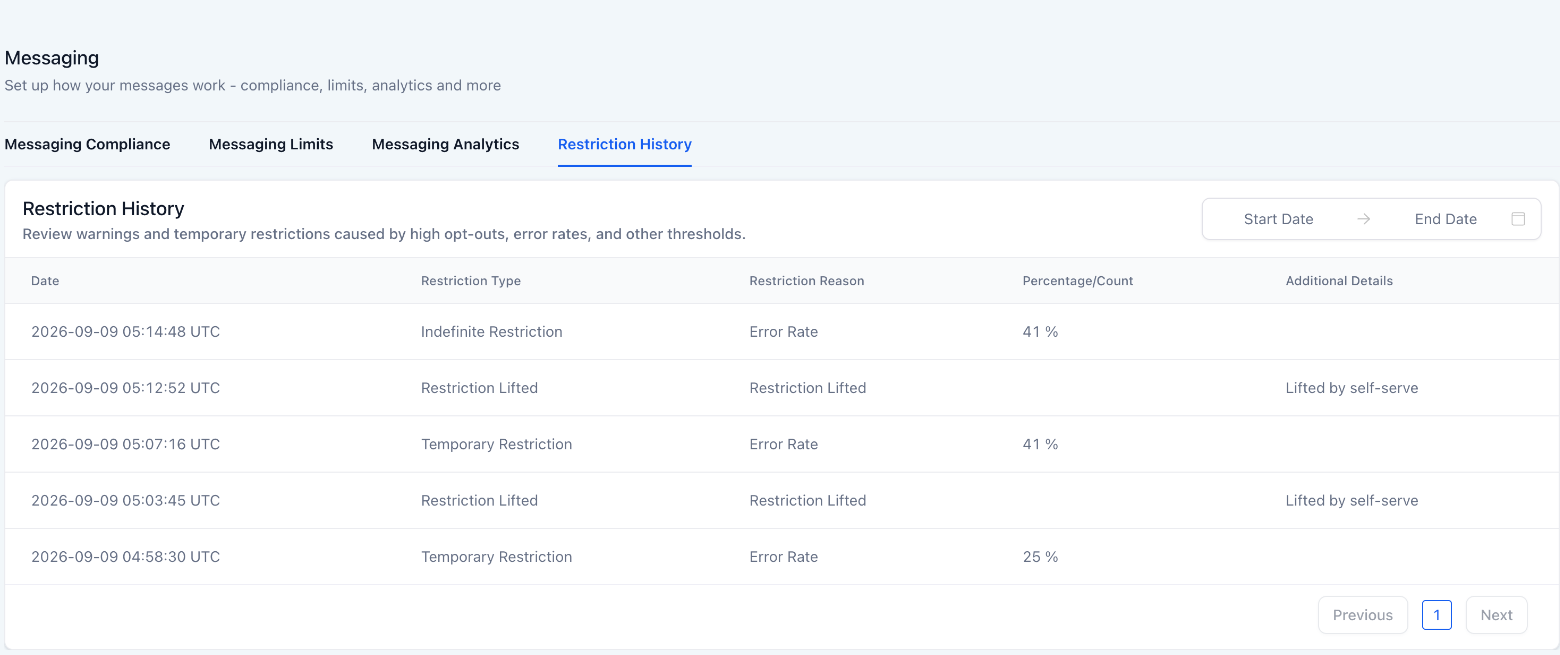
For eligible established accounts, a first temporary restriction lasts 12 hours and the next lasts 24 hours. Repeated problems require Support review with no automatic expiry. New accounts require Support review after their first restriction rather than automatic recovery.
Very high rates can also trigger manual review: opt-outs at or above 12%, or Error 30007 at or above 45%. After a restriction lifts, quality is watched more closely for 72 hours; another problem during that period can trigger the next restriction immediately.
Fix the cause before resuming
Pause the affected campaigns or workflows, check consent and opt-out handling, and remove invalid numbers and prior opt-outs from the sending list. Resuming the same outreach does not reset your quality rates.
Early self-service lifting is limited to authorized owner or admin roles, is not available to regular users or while a Support review is open, and can be used only once every 24 hours. Each use is logged. If your role does not expose that control, contact Support.
Where a review is required, submit Messaging Quality Review from Settings → Phone Numbers. Only one review can be open for an account at a time. Submission does not restore sending: bulk SMS stays paused until Support clears the review.
Find the history behind a notice
Open Settings → Phone System → Messaging → Restriction History to review when a restriction happened, its reason and how it ended. Use that history alongside your account’s actual warning or restriction notice before restarting an opted-in lifecycle campaign.