Reuse skills in your workflow AI agents
Move situational instructions into reusable skills attached to a native workflow AI Agent action. Review each skill and its shared effects alongside the tools the agent can use.
- Creator Platform

Give recurring instructions a place in the library
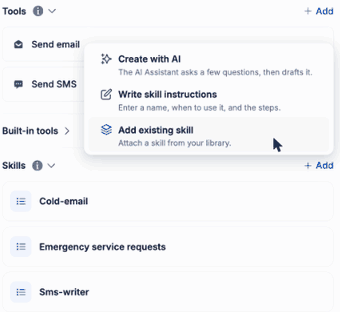
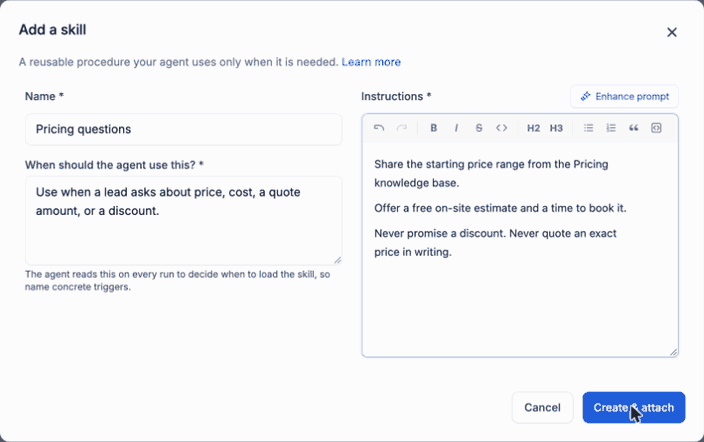
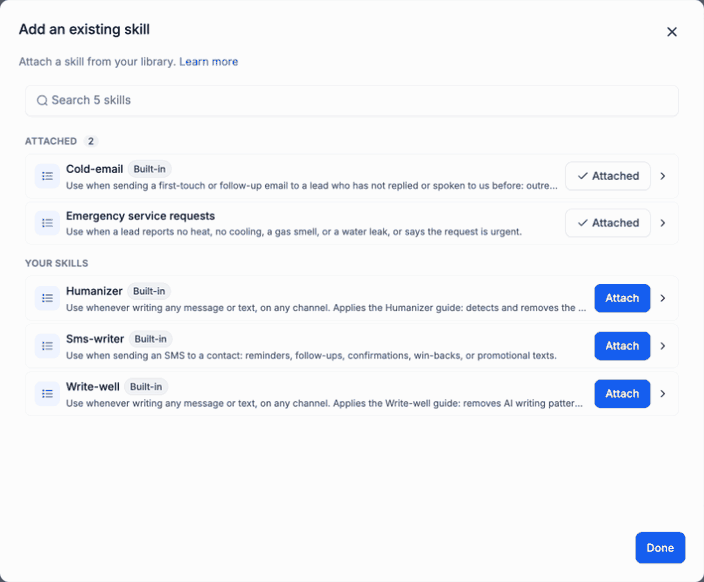
The native workflow AI Agent action now has a Skills section beneath Tools. Create a skill with the AI assistant, write its name, when-to-use description and instructions yourself, or attach an existing library skill. Read the proposed instructions before creating and attaching them.
At the start of a run, the agent reads the name and use description of its attached skills. Full instructions load when the run matches that description, and several skills can apply together. This helps keep the main action instructions focused.
Review changes that affect more than one action
Skills are shared across the account. Editing a skill changes it for every action that uses it. Detach removes it from one action; Delete removes it from the library and all actions using it. Review the affected actions before changing a shared procedure.
A skill supplies instructions rather than permission to act. The action still needs the appropriate tools and existing access. To use a knowledge base, name it in the skill instructions and add the Knowledge base search tool to the action.
Use the existing workflow controls
Where available, open Automation → Workflows, add or open an AI Agent action, then expand Skills. Review the selected skills and configured tools before saving the action and publishing the workflow. Existing account access, workflow permissions and execution costs still apply.
This release concerns the native workflow AI Agent action. It does not extend the Creator Agents connection or guarantee the outcome of an AI response. Public screenshots show historical sample configurations, with no customer message or workflow execution performed for this article.