Repeat workflow actions and follow every matching path
Loop repeats a set of steps for each list item or number. Router follows every matching branch in order, giving one workflow room to handle more than one result.
- Creator Platform

Repeat the steps inside a loop
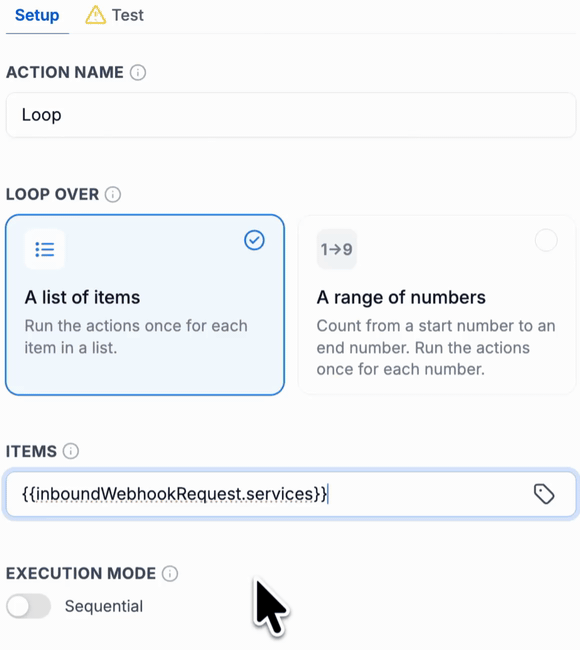
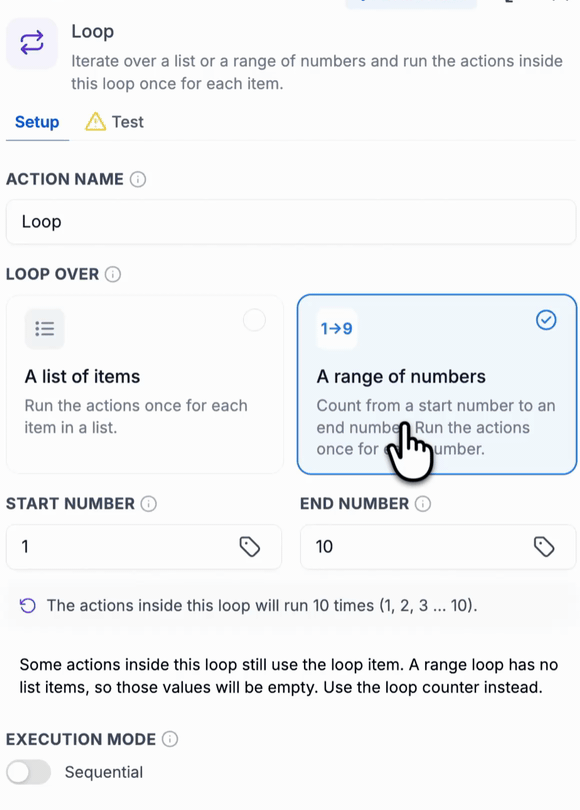
In the native workflow builder, the new Loop action can repeat its enclosed steps for items supplied by an earlier action, such as a webhook, or for a numbered range. Only the steps inside the loop repeat; steps below it run once after it finishes.
For a list, choose the input and map fields from Custom values → Loop Item into the repeated actions. A numbered range has no list-item fields, so use its loop counter instead. The panel shows the number of iterations before the action is saved.
Sequential is the default execution mode. Parallel mode allows several iterations to run at the same time. Choose a mode that fits the actions and external systems involved, and review repeated record changes or messages before publishing.
Follow every matching branch
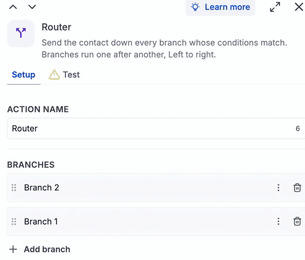
Router evaluates all branches and runs each matching path in sequence from left to right. This differs from If/Else, which stops at its first matching branch. Drag branches in the list to choose their order.
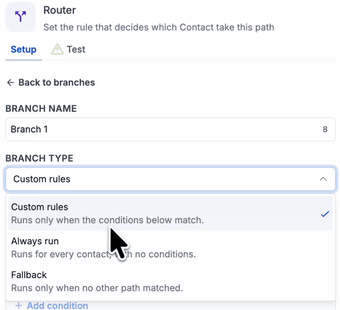
Use Custom rules for a conditional path, Always run for a path without conditions, or Fallback when no other branch matches. A contact that meets several rules can follow several paths; Router branches run one after another.
Review the configuration before going live
Where the new actions are available, find them under Automation → Workflows. Use the Loop Test tab to inspect iteration results or the Router output to inspect branch conditions after a deliberate workflow test. Workflow tests can execute the configured actions; use an appropriate test event and review their effects.
These are native workflow capabilities. Their public examples illustrate configuration and sample results; they do not establish a customer run or add Creator Agents operations. Existing workflow permissions and usage terms continue to apply.