Keep customer records clear and relationships accurate
Rename record display fields without changing internal names, open documents from a list, and choose relationship labels with both sides in view.
- Creator Platform
Keep names useful without changing identifiers
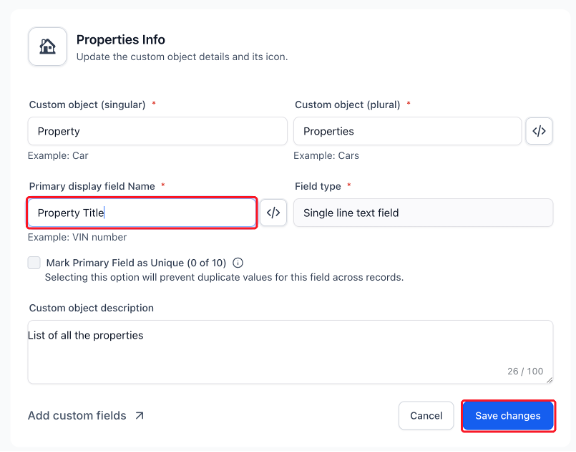
Customer records need to stay understandable as your product and team evolve. In Creator Platform, you can now rename a custom object’s primary display field without changing its field type or internal name.
Open Settings → Objects, select the custom object, edit Primary display field name and save your changes. The code icon beside the object or primary field name lets you reveal and copy its internal name for supported integrations.
Open documents without opening each record
File-upload fields now show clickable document chips in the custom object list. Click a chip to open the uploaded file in a new tab. Hover over a shortened file name or the additional-file count to see the full names.
In Custom Fields settings, the object dropdown also uses the name you gave the Company object, helping you choose the right place to maintain customer data.
Read both sides of a customer relationship
When linking a contact, company, opportunity or custom object record, the association label picker now shows the label used on the other record. Read the Paired with text before selecting a label so a customer stakeholder relationship is clear in both directions.
This works in the record side panel and on the full record page. Users with permission to manage associations can choose Create association label at the bottom of the picker. It opens the form with the other object selected; return to the record to choose the new label.
The shortcut is hidden when the objects cannot be associated or their label limit has been reached. Use its arrow icon to open settings in a new tab and keep unsaved picks in place. Existing Custom Objects access and record permissions still apply.