Draft emails, sequences and tests with AI
Describe an email or a follow-up sequence, then refine the draft in Email AI. The Labs experience can also prepare subject-line or content tests for review before sending.
- Creator Platform

Start with the message you want to send
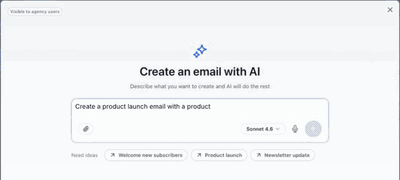
In Marketing → Emails, Create with AI turns a prompt or suggested starting idea into an email draft. Your Brand Board supplies the logo, colors and styling. Refine the result through chat, HTML or visual edits, and add supported merge fields for personalization.
Review generated claims, images, links and compliance content before using the draft. Switching to the Design editor creates a copy, and the converted layout can differ from the original.
Plan a sequence from one prompt
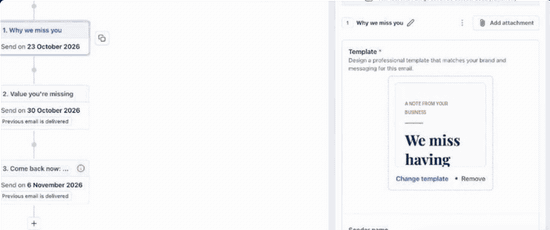
Under Marketing → Emails → Email sequences, Create with AI can prepare a series of emails and the timing between steps. Describe the goal, then supply the audience, sender and intended start time.
Open each step on the canvas to review its message, template and timing. The sequence sends only after you confirm the audience and start time. You can pause it to adjust its steps.
Review variations before starting a test
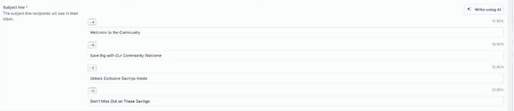
After drafting an email, ask Email AI for a subject-line or content test. It can prepare variations and test settings for you to inspect. Test subject lines or email content separately, then review the audience split, duration and winning metric before approving a send.
The underlying campaign test uses unique open rate or unique click rate to choose the version sent to the remaining audience. Standard campaign testing requires at least 40 contacts overall and 10 per variation. If the selected metric records no engagement, the first variation becomes the default winner. AI-generated alternatives do not guarantee stronger results.
Check Labs access for your workspace
These Email AI capabilities are offered through Labs for eligible workspaces with Email Marketing access. Availability and Labs permissions are managed by admins. If the AI entry point is missing, ask your agency admin to confirm the applicable Email AI Labs access for your subaccount.
The screenshots below are historical official demonstrations. Their sample messages, dates and test values are unchanged; they do not represent a Creator customer campaign or a campaign sent for this release.