Ask Google to review eligible ad policy flags
When Google flags an eligible policy issue on a product campaign, you can request a review from the campaign builder and retry publishing. That does not guarantee approval or unrestricted delivery.
- Creator Platform

When a product campaign cannot publish
You are ready to advertise a product on Google. Publishing stops because Google flagged the ad under its advertising policies. An exemption is a request for Google to review that flag. Google only offers it for some violations, and sending the request does not approve the ad.
Request a review from the campaign builder
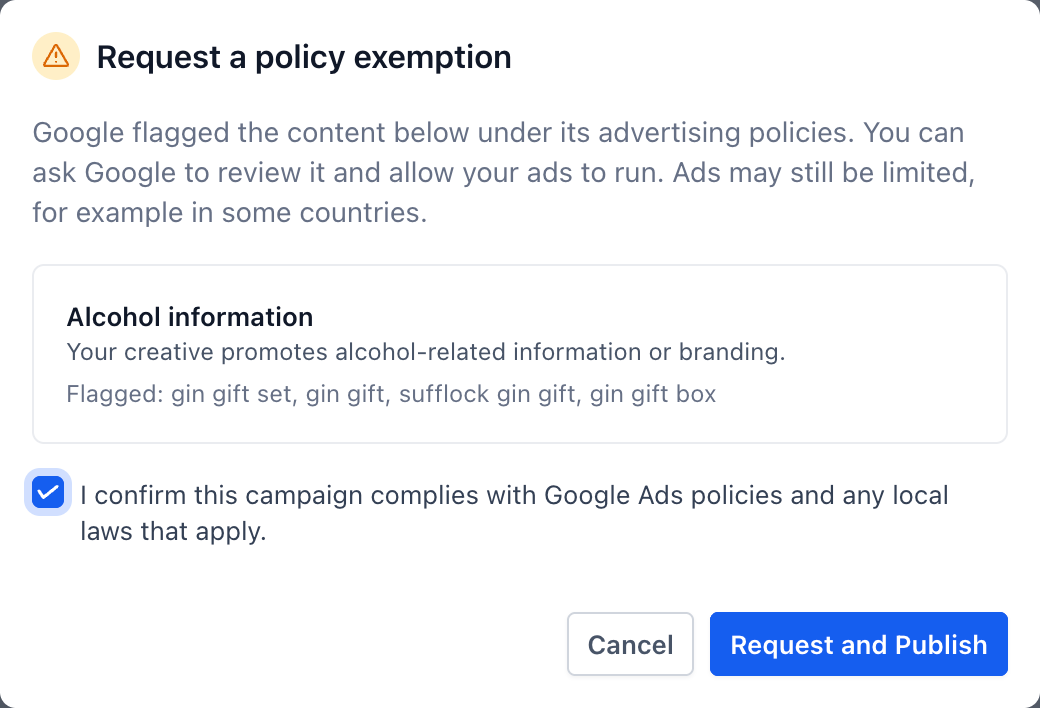
If Google marks the violation as eligible, Request exemption appears next to that publishing error. Opening it shows the policy details and a checkbox to confirm the campaign complies with Google Ads policies and any local laws that apply.
Request and Publish retries the campaign
After you confirm, Request and Publish sends the review request and tries to publish the campaign again. Publishing can spend money. Google may still refuse the flag, the campaign may still fail to publish, and ads may still be limited, for example in some countries.
What still applies
This is for Google campaigns in Creator Platform, and only when Google says the violation is eligible. Other validation or publishing errors still have to be fixed. Google's usual policies and review still apply. You need an existing Google connection and permission to publish the campaign. The official release does not add a Labs flag or a new plan.
This is based on the official public release and demonstration, not a fresh run in a Creator account. Creator Agents does not send this Google exemption request.