Create sharper marketing images and compare costs
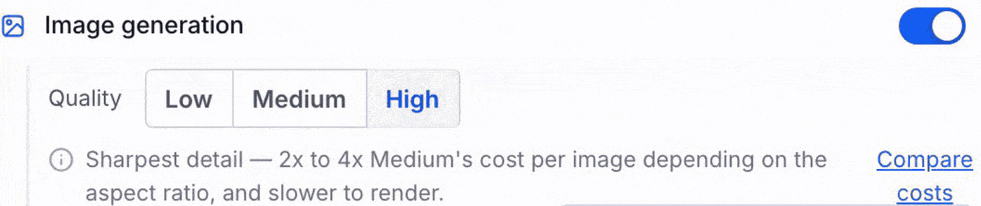
Choose Low, Medium or High when a Managed Agent creates marketing images, compare relative cost first, and see the model, quality and size in the logs after a run.
- Creator Platform
Sharper images for launch and ads
When a startup is about to launch, social posts and ads need pictures people can actually read. A Managed Agent is an assistant you run in Creator Platform. Image Generation is the setting that lets that agent make pictures from a written prompt.
Medium and High quality now use GPT Image 2.6. The official release describes that model as sharper detail and clearer text than before. Low still uses GPT Image 2.5, which is meant for quicker, cheaper drafts. You can generate at 1:1, 9:16, 16:9 or 21:9.
If Image Generation is already on, existing agents pick up the new Medium and High model and keep the quality level you already selected.
Compare relative cost before you run
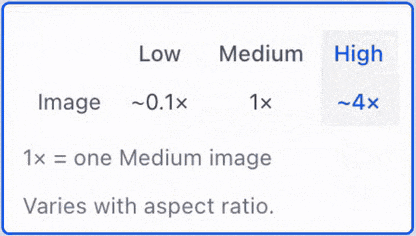
High costs more and can take longer. Before you generate a set of launch images, open Compare costs. The table shows multipliers of one Medium image, not a currency price. Low is about 0.1x, Medium is 1x and High is about 4x.
Next to High, the quality note can read 2x to 4x Medium's cost per image depending on the aspect ratio. Those figures are approximate and change with the ratio you pick. They are not currency prices or a fixed quote.
Check the run after it finishes
Some image jobs keep running in the background. When that work finishes, Activity refreshes. The agent's logs record the model, quality and size used for each image, so you can see whether a High run was actually what ran.
Access in Creator Platform
This change is in Creator Platform for accounts that already have a Managed Agent and Image Generation permission. The same permissions and usage limits still apply. The official release does not add a Labs flag or a new plan, and it does not add a Creator Agents image tool. If you generate images on a separate host, that still depends on that host's provider and budget.