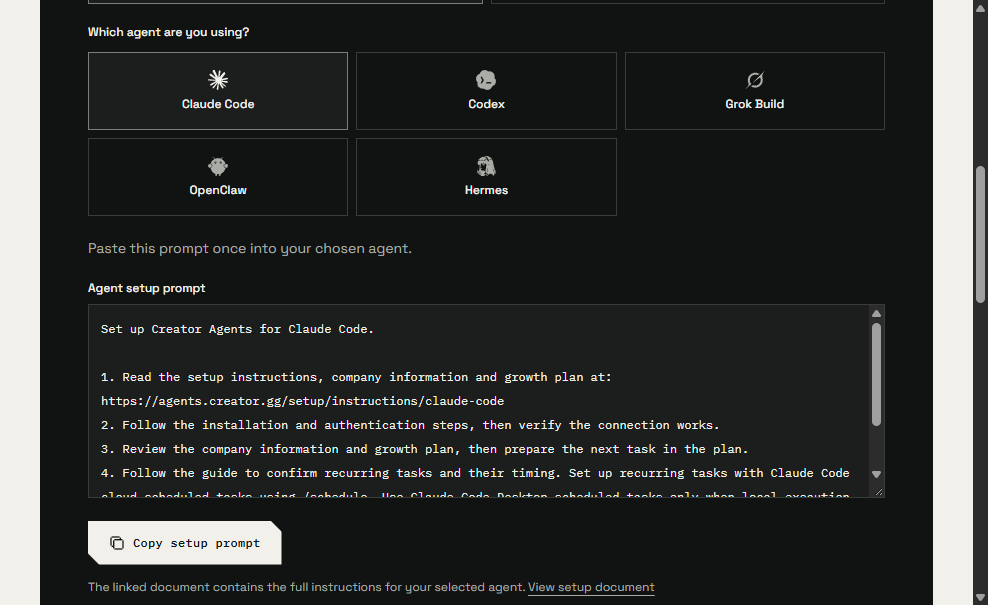
Copy a shorter setup prompt for your agent
Choose your agent, copy a four-step prompt, and open hosted instructions for that host. Existing connections stay in place.
- Creator Agents

Copy a four-step prompt
Agent setup now gives you a short prompt for the agent you select. Choose local or cloud, pick the agent, then copy the prompt or open its hosted instructions document.
The prompt tells the agent to read that document, connect and check access, review your company information and growth plan, then follow the scheduling note for that host. The full setup steps stay in the linked document.
What stays the same
Verified free accounts can still connect for private business context and the saved growth plan without turning on paid marketing. Connected marketing work, including daily comment reply drafts you review before they are sent, still needs Creator Platform access.
If you copy the prompt from a signed-in company dashboard, it can attach a private snapshot of your current overview and plan. Anyone with that link can read the snapshot until you revoke it. It does not include owner email, connection state or full private intelligence. Public setup without a company profile uses the generic guide.
Scheduling is checked per host
The prompt includes a scheduling note drawn from that host's public documentation. Copying it does not create a job, and a connection on one computer does not appear automatically in another host. If the host has no verified recurring path, manual work stays usable.
Refreshing an agent that is already connected remains a separate maintenance path. Use the existing refresh guide when you need to update older guidance without starting a new setup.