Pause the bot after a teammate answers from a connected inbox
A customer asks about a product in a connected social inbox, and a teammate answers there. That reply now pauses Conversation AI for that contact, so the bot does not send a second answer.
- Creator Platform
When the bot answers after a person already did
A customer asks whether the new speaker comes in blue. A teammate answers from the connected Instagram inbox, and that reply shows up in the conversation. Conversation AI is the bot that replies there. It used to send its own answer anyway, because it only treated a message sent inside Creator Platform as a person stepping in.
A reply from outside can use the existing pause
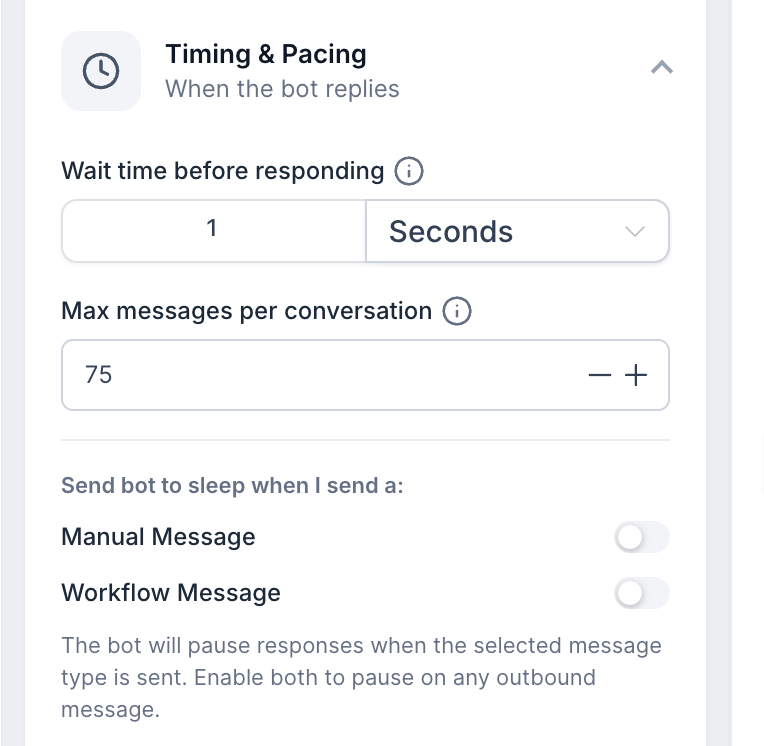
Auto Pilot means the bot sends replies on its own. Manual Message is the switch that pauses it when a person sends a message. A teammate's reply that comes in from outside now counts for that switch, for this contact, for the quiet time already set on the bot.
A message sent by a workflow still follows the separate Workflow Message switch. An email reply sent from outside does not pause the bot. The same pause applies on the other channels where this bot already replies.
Where to turn it on
Open AI Agents, then Conversation AI, and open the bot. In Bot Settings, set the status to Auto Pilot. Open Timing & Pacing. Under Send bot to sleep when I send a:, turn on Manual Message and set how long the bot should stay quiet. If Manual Message is off, a reply from outside does not pause the bot.